Summary
iQBus now ships with a built-in MCP Server. Any MCP client, Claude, Microsoft Copilot, an agent in VS Code or one you build yourself, can connect to iQBus and create a complete integration: ports, pipelines, pipeline components, maps and promoted properties. In our own test an agent assembled an end-to-end integration; a person added the credentials and reviewed it before use. Three access levels, Off, Structure and Full access, decide per environment what an agent can see. Included with the Grow and Enterprise plans.
01 / What happened
We asked an outside AI agent to build a whole integration. It did.
For the last year the AI inside iQBus has been a drafting tool: describe a pipeline component, a custom function or a map, and the AI Accelerator writes a first version for your engineers to review. Useful, and deliberately bounded.
This month we switched on something broader. iQBus now has a built-in MCP Server. MCP, the Model Context Protocol, is the open standard that lets an AI assistant work with the tools around it. With the server on, an agent that lives outside iQBus can operate iQBus: read the configuration, create artifacts, watch the runtime.
So we gave it the real job. We connected a general-purpose AI agent over MCP and asked it to prepare an end-to-end integration between a cloud platform and an internal system, ready to test. No step-by-step instructions, just the request.
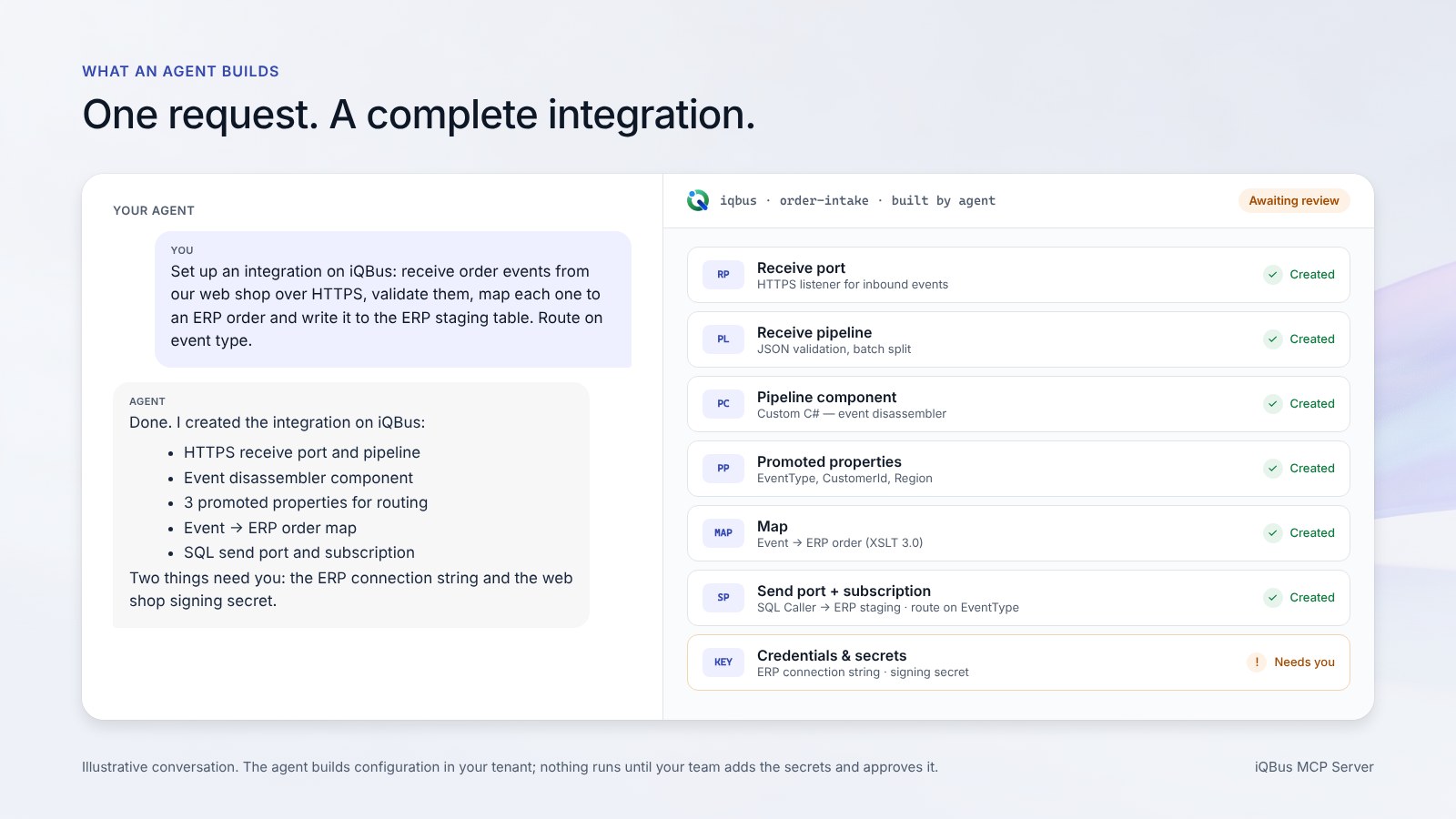
When it finished, this existed in iQBus:
- PORTReceive port and receive pipelinecreated
- COMPPipeline components, in C#created
- PROPPromoted properties for routingcreated
- MAPTransformation map, XSLT 3.0created
- PORTSend port and subscriptioncreated
- KEYTokens, passwords and connection secretsleft for a person
The holes were exactly the ones you would want: credentials. The agent built the structure and the logic and stopped where secrets begin. A person on our team filled those in, opened the result in iQBus, read it through and approved it. Then it ran.
This was one integration, in our own tenant, on a request we wrote ourselves, so we are not publishing it as a benchmark. What it tells you is the shape of the work: the agent does the assembly, people do the judgement.
02 / Why MCP
Your agent, not ours.
Every integration platform now has a chat box. Most of them are a product feature: a model the vendor chose, trained on the vendor’s documentation, living inside the vendor’s console. You get what it can do, and nothing else.
An MCP Server is a different decision. It makes iQBus a tool your own agent can use. If your organisation has standardised on Microsoft Copilot, that is the agent. If your developers live in VS Code with GitHub Copilot, that is the agent. If you run Claude, or an agent you built on an internal model, same answer. The platform does not care which model is on the other end, and you are never locked to one.
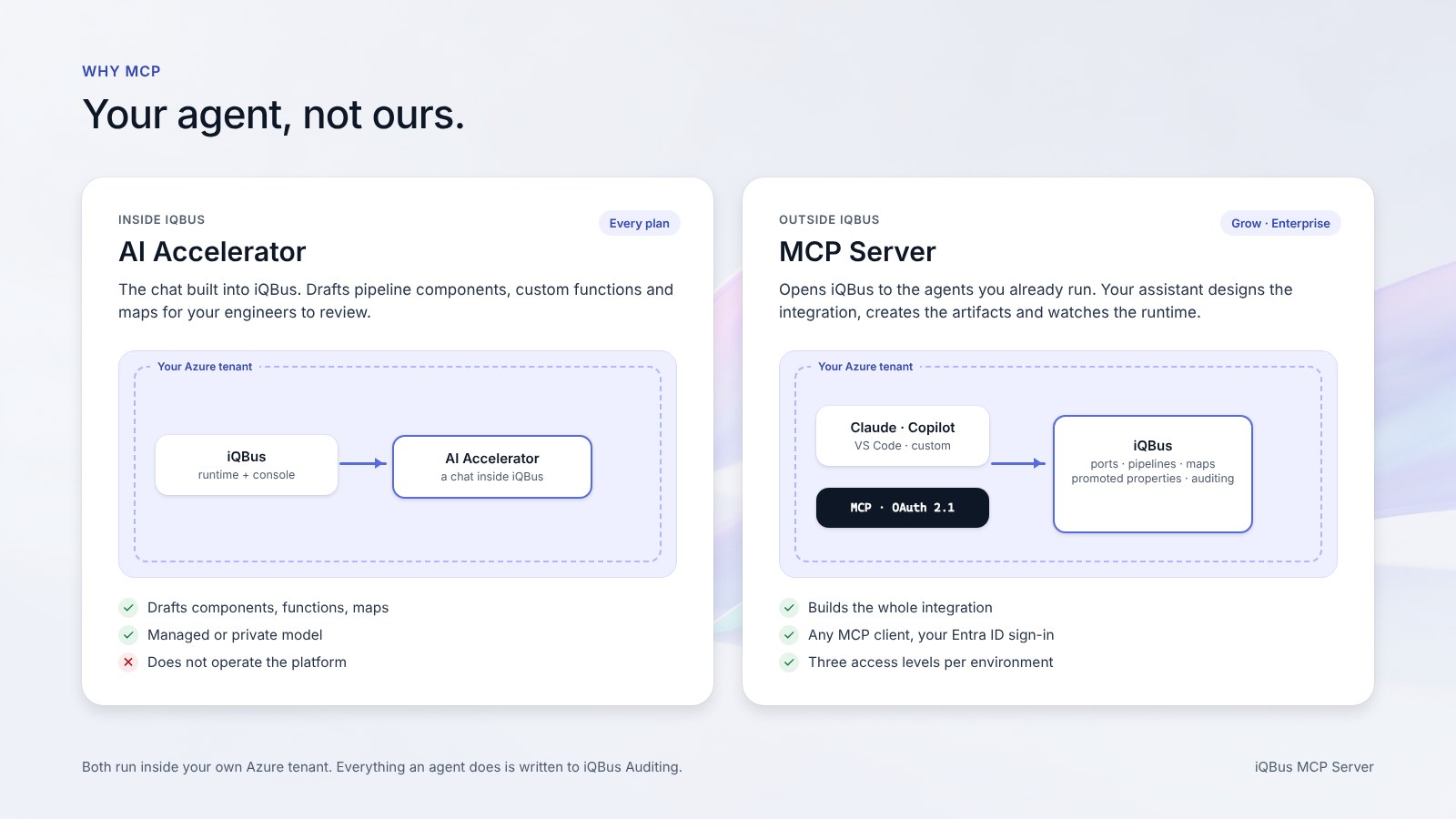
AI Accelerator (every plan)
The chat inside iQBus. Drafts pipeline components, custom functions and maps. Your engineers review the draft and put it to work.
MCP Server (Grow and Enterprise)
Opens iQBus to agents outside it. An agent can design the integration, create the artifacts and watch the runtime, within the access level you set.
Both run inside your own Azure tenant. Both authenticate through Microsoft Entra ID; the MCP Server uses OAuth 2.1, so an agent never holds a separate iQBus credential. Everything an agent does is written to iQBus Auditing like any other change, so the audit trail is the one you already have.
03 / Access levels
Plug in any AI. You decide what it sees.
The question a Director asks first is not “how fast”. It is “what can it see”. The MCP Server answers that with three access levels, set per environment:
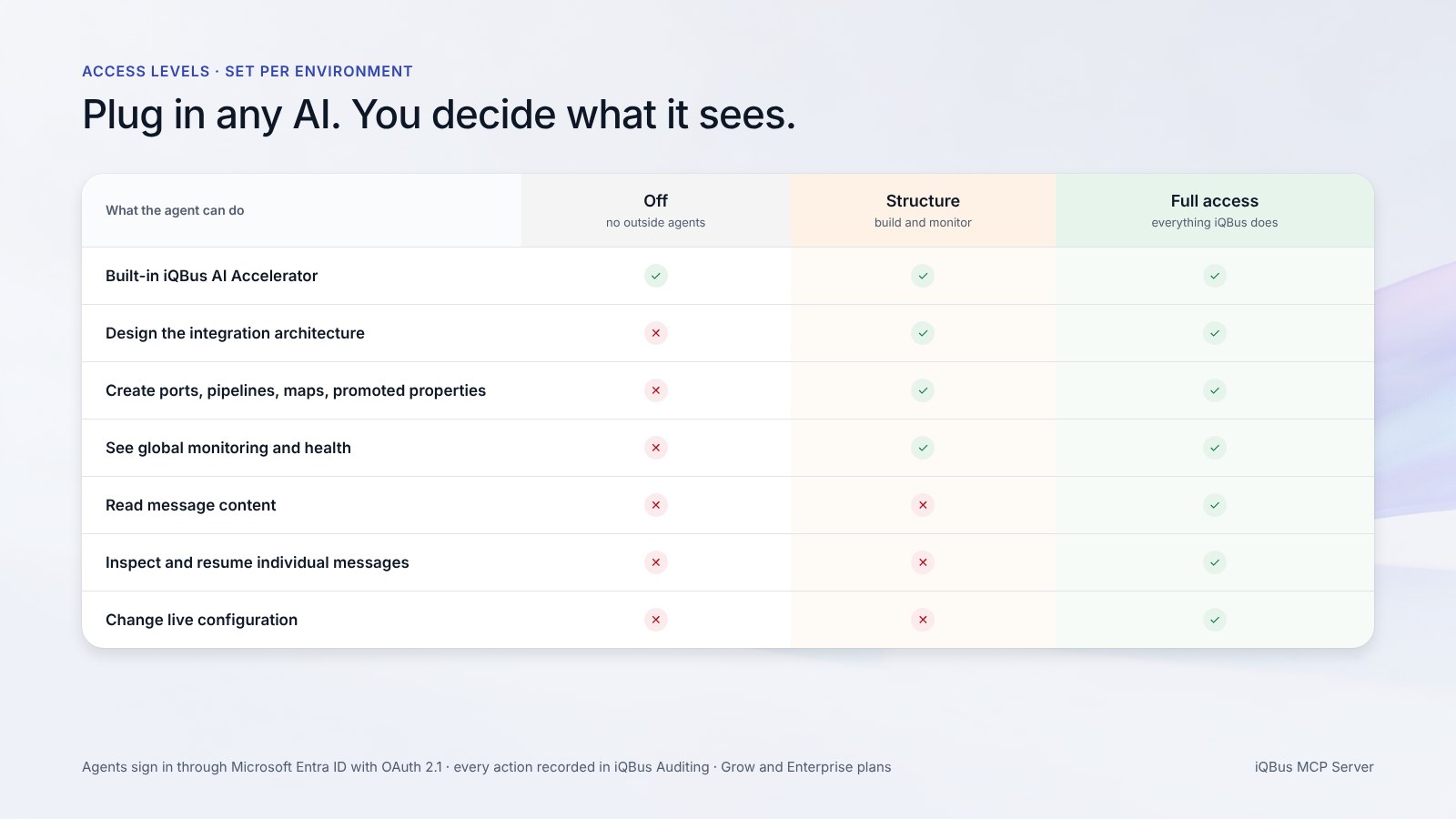
Off
No outside agents. The built-in AI Accelerator is the only AI that touches this environment.
- iQBus AI Accelerator
- External agents
Structure
An agent can build the overall architecture of an integration and see global monitoring, but cannot read any message content.
- Create ports, pipelines, maps
- Global monitoring and health
- Message content
- Individual message inspection
Full access
An agent can do everything iQBus does, within the permissions you grant through Entra ID.
- Everything in Structure
- Read messages, resume suspended runs
- Change live configuration
Structure is the level we expect most production environments to settle on. It lets an agent do the part that saves the most time, the assembly, while the content of a payment, a lab result or a purchase order stays where it was: visible to people with the rights to see it, and to nobody else.
04 / What stays with people
The four things the agent does not decide.
An agent that can build a whole integration raises an obvious question: what is left for the team? In practice, the parts that carry the risk.
Secrets
Tokens, passwords and connection strings are never generated and never guessed. The agent leaves a named gap; a person fills it, and the secret lives in Azure Key Vault as before.
Approval
Nothing an agent builds carries traffic until someone has opened it in iQBus, read it, and put it to work. There is no release and no restart, so approval is the only gate, and it is a human one.
The access level
Which agents can connect, and what they can see, is an administrator’s setting per environment. The agent cannot raise its own level.
The record
Every artifact an agent creates is recorded in iQBus Auditing with the identity it signed in with. If something is wrong a week later, you know who asked for it, which agent built it, and who approved it.
This is the same division of labour we apply to the AI Accelerator, and to our own migration tooling: the machine does the volume, people do the judgement, and iQBus Auditing keeps the record.
05 / Getting started
Included with Grow and Enterprise.
The MCP Server is part of the Grow and Enterprise plans; Starter keeps the built-in AI Accelerator. Switching it on is an environment setting, and connecting an agent is the same OAuth sign-in your people already use with Microsoft Entra ID.
If you want to see what this looks like against an integration of your own, bring one. Describe an interface your team has been waiting on, and an integration architect will walk through how an agent would build it on iQBus, what it would need from you, and which access level fits your environment.
Bring an integration you need. We’ll walk through how your agent would build it on iQBus.
Frequently asked questions
What is the iQBus MCP Server?
MCP, the Model Context Protocol, is the open standard AI assistants use to work with external tools. iQBus includes an MCP Server, so an AI agent your team already uses, such as Claude, Microsoft Copilot or an agent in VS Code, can connect to iQBus and design, build and monitor integrations through it. It is included in the Grow and Enterprise plans.
Which AI agents can connect to iQBus?
Any client that speaks MCP. That includes Claude, Microsoft Copilot and Copilot Studio, GitHub Copilot in VS Code, and custom agents built on the common agent frameworks. Agents sign in through Microsoft Entra ID with OAuth 2.1, so you are not tied to one AI vendor and the agent never has its own credentials to iQBus.
Can an AI agent read our message data through iQBus?
Only at the Full access level, and only if you set that level for that environment. At Structure, an agent can build an integration’s architecture and see global monitoring but cannot read any message content. At Off, no outside agent can connect at all. The level is set per environment, so Full access in test and Structure in production is a normal configuration.
What can an agent build on iQBus, and what can it not do?
It can create a complete integration: receive and send ports, pipelines and pipeline components, maps, promoted properties and the subscriptions that route messages. It cannot supply credentials, tokens or secrets, which a person adds, and nothing it builds carries traffic until your team has reviewed it in iQBus.
Is the MCP Server the same as the iQBus AI Accelerator?
No. The AI Accelerator is the chat built into iQBus; it drafts pipeline components, custom functions and maps, and is included in every plan. The MCP Server opens iQBus to agents outside it, so your own assistant can operate the platform. Grow and Enterprise include both.
Does an agent-built integration need a release or a restart?
No. What the agent creates is iQBus configuration in your own Azure tenant. Once your team has added the secrets and approved it, it is in use, with no build, no release window and no restart, the same as any change made by a person.