
The bus is already built
Routing, pipelines, maps, adapters, partner agreements, retries, suspend and resume — in AIS you design these from primitives. In iQBus they are the product.
Azure Integration Services is a toolkit — Logic Apps, Service Bus, Functions, API Management, Event Grid, Integration Account — each designed, secured, monitored and metered on its own. iQBus is the ESB those pieces add up to, as one product in your Azure tenant.
 iQBus · Azure-native ESB
 Available onAzure Marketplace
An architect at a glass whiteboard covered in boxes and arrows connecting separate services explains to two colleagues on stools
Integration teams that run on Cerebrum City engineering
















Routing, pipelines, maps, adapters, partner agreements, retries, suspend and resume — in AIS you design these from primitives. In iQBus they are the product.
Logic Apps actions, Service Bus tiers, Functions executions, API Management units, Event Grid operations, Integration Account tiers. iQBus is licensed per core; Starter has no licence fee.
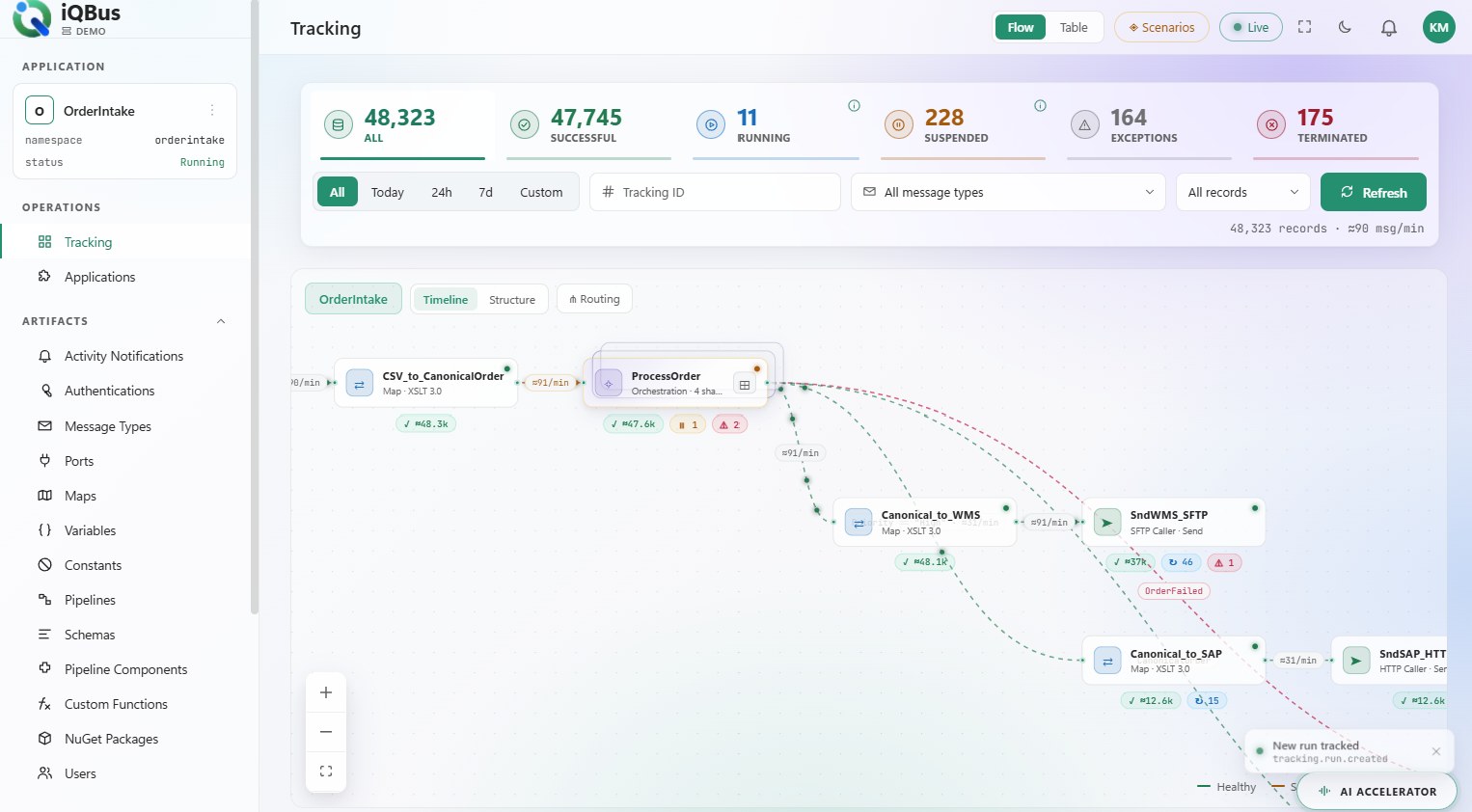
Cross-service tracing in AIS is assembled in Log Analytics and Application Insights. iQBus ships a flow tracking dashboard: every message, every port, suspended runs with one-click resume.
What each one meters, where it runs, what you build yourself and what comes in the box.
| Capability | Azure Integration Services | iQBus |
|---|---|---|
| What you pay for | Six services, six metersActions, tiers, executions, units, operations | Cores you runStarter: no licence fee, ever — you pay only your own Azure |
| What you build | The integration layer itselfFrom Logic Apps, Service Bus, Functions, APIM, Event Grid | The integrationsThe bus is the product |
| Routing | Service Bus topics + filters you design | Pub/sub on message type and promoted valuesConfigured in the console |
| B2B / EDI / HL7 | Integration Account + Logic AppsPartners and agreements as a separate resource | EDI and HL7 in the runtimeIn production with customers today |
| Tracking & exceptions | Log Analytics + App Insights, per serviceCorrelation is yours to build | One flow tracking dashboardSuspended runs, one-click resume |
| AI & agents | Copilot and Foundry-hosted agent loopsMicrosoft-hosted models | AI Accelerator + MCP ServerBoth run in your tenant |
| Making a change | Change each service; IaC redeploys | Configuration, liveNo builds, no deployment windows |
| Where it runs | Your Azure subscription | Your Azure subscriptionAzure App Service and Azure SQL in your tenant |
Comparison reflects each vendor's publicly documented capabilities and pricing pages as of October 2026; details change without notice, so confirm against the vendor before you decide. Azure Integration Services and the other product names are trademarks of their respective owners; iQBus is not affiliated with them.
Azure Integration Services gives you the parts; you design the bus. Tick what your estate needs and count the services you would provision, secure and monitor — then look at the iQBus column.
On iQBus you configureResource counts follow Microsoft's documentation for Logic Apps, Service Bus, Functions, API Management, Event Grid and the Integration Account; each service has its own meter, so no combined dollar figure is shown. Based on each vendor's public documentation as of October 2026; confirm against the vendor before you decide. See iQBus pricing.
 Pharma packaging line
Validation engineer
Every carton event has to reach the serialisation system and the ERP, in order, with proof. One validated bus beats six services with six change-control records.
 Architecture review
Security officer
Six services means six identities, six network paths, six logs. iQBus is one application in your tenant with Entra ID and OAuth 2.1 — one review, one boundary, nothing outside it.
 Retail back office
Store systems
POS, e-commerce, warehouse and ERP exchange thousands of messages a day. iQBus routes, maps and tracks them, and the store team sees the sync status without a cloud-engineering ticket.
The iQBus console with sample data. Follow a message through every port, map and pipeline, open a suspended run and resume it — the part you would otherwise assemble from logs.
No sales cycle to start. Get iQBus from Azure Marketplace, create it in your subscription, sign in with Entra ID and configure your first integration. Starter has no licence fee, ever — you pay only your own Azure.
Starter no licence fee · Grow and Enterprise licensed per core · no per-message, per-connection or per-partner metering · pricing
If you have a platform team that wants to compose its own integration layer from primitives — and the time to own it — AIS gives you every building block, and iQBus itself stands on Azure services. iQBus is for teams that want the bus delivered: install it, configure integrations, see them run.
Not sure which shape your estate is? Ask an architectiQBus has been a real asset to the business. Its intuitive interface allowed us to implement EDI effortlessly, and the built-in transaction tracking gives us the visibility to manage operations with confidence.
Cheryl Patterson, Chief of Staff, CPA, Novelty Inc.
Read the case study (PDF)
Send us your integration landscape — on Azure Integration Services, BizTalk or anything else. An integration architect returns a tailored map of what carries over, what changes and how a phased move would run.
You'll speak with a senior integration architect, not an SDR.
Still weighing it? Talk to an Integration Architect.
Further reading: The BizTalk alternative · BizTalk vs iQBus cost · iQBus pricing
Yes. Azure Integration Services is a set of services — Logic Apps, Service Bus, Functions, API Management, Event Grid, Integration Account — from which you assemble an integration layer. iQBus is that layer delivered as one product in your Azure tenant: ports, adapters, pipelines, XSLT 3.0 maps, pub/sub routing, EDI and HL7, a flow tracking dashboard and in-tenant AI.
Each AIS service has its own meter — Logic Apps actions or hosting plans, Service Bus tiers, Functions executions, API Management units, Event Grid operations, Integration Account tiers. iQBus Starter has no licence fee; Grow and Enterprise are licensed per core, and the Azure it runs on is billed to your own subscription.
It runs on it. iQBus is deployed into your own Azure subscription — Azure App Service and Azure SQL in your tenant — with Entra ID and OAuth 2.1. You keep Azure; you stop assembling the bus by hand.
Yes. The iQBus MCP Server (Grow and Enterprise) lets an outside AI agent build integrations — ports, pipelines, pipeline components, maps, promoted properties — with a person approving before anything goes live, and iQBus Auditing records what it did. Starter includes the built-in AI Accelerator. Both run inside your tenant.
Get iQBus from Azure Marketplace and create it in your own subscription. Starter has no licence fee, ever — you pay only your own Azure. Or talk to an Integration Architect first and we will map your estate to iQBus with you.